Showing posts with label iPod. Show all posts

Tuesday, October 4, 2011

Apple announces refreshed nano lineup, available today


Apple’s Phil Schiller just announced slightly refreshed iPod nanos. It appears to be largely the same design as the current nano with an altered UI allowing you to swipe through large icons. They’ve also included improved Nike+ fitness features, and included 16 new watch faces. We’ve also learned (via MacStories)that the 2010 iPod nanos will be able to get the new features via a firmware update.

The iPod nano will be available starting today in seven colors for $129 for 8GB and $149 for 16GB.

*thanks 9to5mac*

Send us a story or tip @ TipsForLimerain.com@gmail.com and follow our pages for the latest limera1n, rubyra1n, and all tech stories, follow us on Twitter at @iphonepixelpost or @limerain_com
And like our Facebook page www.iPodSets.com
- Posted using my iPhone 4

Cook: “iPod is still a large and important market for Apple”


Image via Engadget

Another tidbit regarding the iPod. Apple’s music player brand still holds a 78 percent market share a decade since its launch. Quite impressive. They sold over 300 million iPods to date. “It took Sony 30 years to sell 220,000 Walkman cassette players,” Apple CEO Tim Cook remarked. We take it that means the iPod classic isn’t going away.

The iPod family of music players still have a lot to offer, he said, noting that nearly half of sales are from users who already own one. Apple shipped 45 million iPods from July of last year to June of this year. As for iTunes, the online music store now commands a 20 million songs-strong catalog. Remember, iTunes Store launched with just 200,000 songs.


*thanks 9to5mac*

Send us a story or tip @ TipsForLimerain.com@gmail.com and follow our pages for the latest limera1n, rubyra1n, and all tech stories, follow us on Twitter at @iphonepixelpost or @limerain_com
And like our Facebook page www.iPodSets.com
- Posted using my iPhone 4

Apples 'Lets Talk' event Live blog

We will be hosting a live blog updated every for seconds. Please tune in at 10am Pacific time and 1pm eastern time. Refresh the page often for new information. We will be gathering the information from various sources and posting it all in one live blog.

For a full live blog tune in at LimeRain.com, a full live blog will be posted on our site after the even is done.

Send us a story or tip @ TipsForLimerain.com@gmail.com and follow our pages for the latest limera1n, rubyra1n, and all tech stories, follow us on Twitter at @iphonepixelpost or @limerain_com
And like our Facebook page www.iPodSets.com
- Posted using my iPhone 4

Tuesday, May 10, 2011

New Nano with camera makes another appearance


Just over a month ago, we showed you the case of what seems to be the next generation Nano with a camera. The leak’s proximity to April Fool’s day led many to be skeptical of the leak. Fast forward to today where the same source produced a more complete picture of what Apple may announce in September.

The new photo shows a more complete picture with the clip pulled from the design. (Back shown on the left, front shown on the right) The site says a 1.3 megapixel camera is slated to go into the new device. While a camera of this size would have limited use, it would make a great addition to an already feature packed micro-device.

What isn’t clear is how this device will be held. We’re considering a magnetic option or a iWatch attachement which seems to be all the rage. Thoughts?

The case closeup from last month is shown below:


*thanks 9to5Mac*

Our new Forum is now open here or on the top tabs marks Forums, please register and post.. For the latest limera1n, rubyra1n, and all tech stories, follow us on Twitter at @iphonepixelpost or @limerain_com www.iPodSets.com
- Posted using my iPhone 4

Sunday, April 3, 2011

Untethered Jailbreak is Coming Soon via RedSn0w and PwnageTool, No iPad2 Support


The iPhone Dev-Team has announced that they will release updated versions of both RedSn0w and PwnageTool to provide an untethered jailbreak for iOS 4.3.1.

Currently the team is working on overall 4.3.x jailbreak issues and getting Cydia ready for the release. I0n1c's untether has been tested and described as 'solid'.

The upcoming releases of RedSn0w and PwnageTool will support the Apple TV 2 but will not support the iPad 2. Musclenerd notes that they are waiting to find a legal method of distributing comex's 4.3 jailbreak for the iPad 2 before they make it public.

We will let you know as soon as the jailbreak becomes available.


*thanks iclarified*

Our new Forum is now open here or on the top tabs marks Forums, please register and post.. For the latest limera1n, rubyra1n, and all tech stories, follow us on Twitter at @iphonepixelpost or @limerain_com www.iPodSets.com
- Posted using my iPhone 4

Wednesday, February 23, 2011

iPod Nano Update Lets You Turn It Off


Apple has released an update to the sixth generation iPod nano that lets you turn it off

With iPod software update version 1.1 for iPod nano (6th generation), you will be able to:
● Completely turn off the iPod, rather than just put the device to sleep.
● Control music or radio playback using the Sleep/Wake button without having to look at the device.

Turning iPod nano off completely and turning it on again
● Hold down the Sleep/Wake button for several seconds to turn iPod nano off completely.

Controlling audio playback with the Sleep/Wake button
You can double-click the Sleep/Wake button to play the next audio track, or change the setting so that double-clicking pauses or plays the current track. To set the Sleep/Wake button for audio playback:
● On the Home screen, tap Settings.
● Tap Music, and then tap the Sleep/Wake Button.
● Tap the On/Off switch.
● Tap either Next Track or Play/Pause.


*thanks iclarified*

Our new Forum is now open here or on the top tabs marks Forums, please register and post..

For the latest limera1n, rubyra1n, and all tech stories, follow us on Twitter at
@iphonepixelpost or @limerain_com
www.iPodSets.com
- Posted using my iPhone 4

Wednesday, February 9, 2011

Do iPod Classic Shortages Mean Discontinuation or Update?


The iPod Classic is listed as being backordered or out of stock at many retailers leading to speculation that it might be discontinued or updated in the near future, according to AppleBitch.

The Apple Store shows that the silver iPod Classic now ships in 1-3 days, down from 24 hours last week. In addition, Best Buy has updated their website to say that the device is backordered for 1-2 weeks (last week it was shipped in 1 day) and Target also has it backordered for 2-4 weeks. Amazon.com shipping times are 2-4 weeks, Apple Reseller J & R are completely out of stock. Currently the shortage only seems to be affecting the silver colored model, the dark colored version appears relatively unaffected.

Last month Toshiba introduced a new 1.8-inch hard drive that could be used to bump the iPod Classic's capacity to 220GB from 160GB. It's unclear if these shortages are in advance of an update or if Apple has decided to discontinue the device. The iPod Classic did not receive an update in September alongside the rest of the iPod lineup.


*thanks iclarified*

Our new Forum is now open here or on the top tabs marks Forums, please register and post..

For the latest limera1n, rubyra1n, and all tech stories, follow us on Twitter at
@iphonepixelpost or @limerain_com
www.iPodSets.com
- Posted using my iPhone 4

Monday, February 7, 2011

LAPP Seize $10 Million in Fake iPhones, iPods


The Los Angeles Port Police have seized more than $10 million in counterfeit iPhones and iPods from a sophisticated downtown warehouse.

"This was a well-funded operation, and the counterfeits looked very authentic," said Ron Boyd, chief of the L.A. Port Police force. Boyd notes that a buyer might not have noticed the counterfeit until he or she got home and tried to hook up with iTunes.

Investigators said they thought that the shipment was designed to get Apple Inc. lookalike products into the market during the recent buzz over the Consumer Electronics Show. Some of the products were designed to look like older Apple products, such as iPod Nanos without touch screens, which remain popular with some consumers.

Bahram Zahab, 45, and his brother Edward Zahab, 40, have been arrested and charged with the sale of counterfeit goods.


*thanks iclarified*

Our new Forum is now open here or on the top tabs marks Forums, please register and post..

For the latest limera1n, rubyra1n, and all tech stories, follow us on Twitter at
@iphonepixelpost or @limerain_com
www.iPodSets.com
- Posted using my iPhone 4

Tuesday, February 1, 2011

Apple Revises Liquid Damage Policy for iPods


Apple has revised its policy on performing repairs for iPods and possibly iPhones that have activated Liquid Contact Indicators.

A document obtained by iGeneration indicates that Apple may still uphold your warranty even if the LCI is activated.

If a customer disputes whether an iPod with an activated LCI has been damaged by liquid contact and there are no external signs of damage from corrosion, then the iPod may still be eligible for warranty service

Back in November another internal document was leaked which also instructed representatives to inspected iPods for additional signs of liquid damage.

In April, a class action lawsuit was filed against Apple alleging that the company knowingly denies warranty service based on unreliable LCIs.


*thanks iclarified*

Our new Forum is now open here or on the top tabs marks Forums, please register and post..

For the latest limera1n, rubyra1n, and all tech stories, follow us on Twitter at
@iphonepixelpost or @limerain_com
www.iPodSets.com
- Posted using my iPhone 4

Monday, January 3, 2011

How to Quickly Boot Your Tethered Jailbroken iPhone (Windows)


These are instructions on how to quickly boot your tethered jailbroken iPhone using RedSn0w for Windows.

Step One
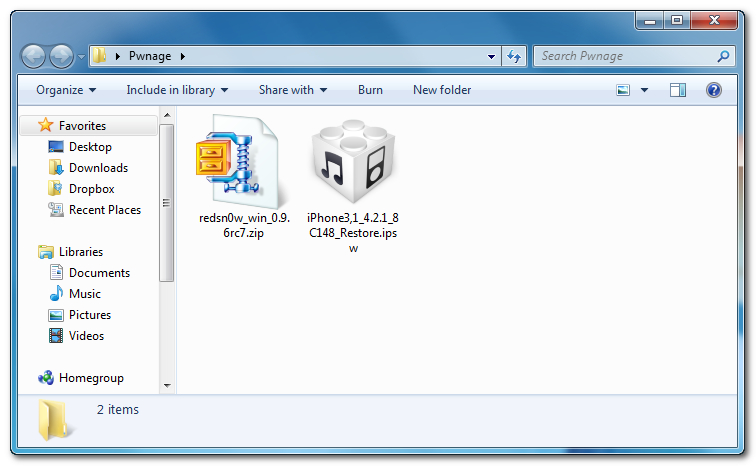
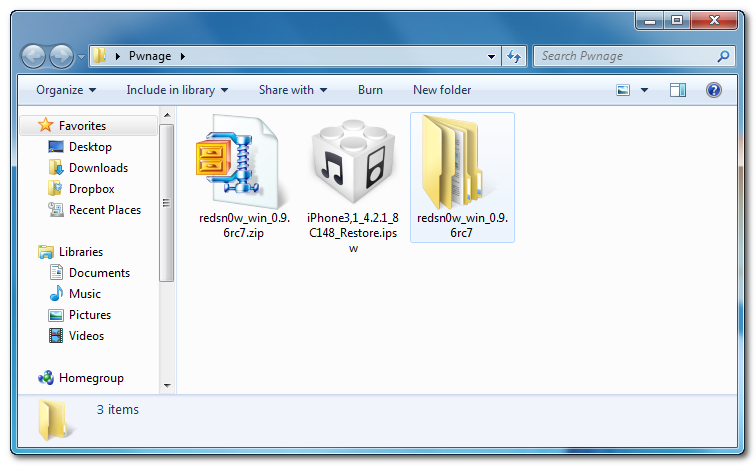
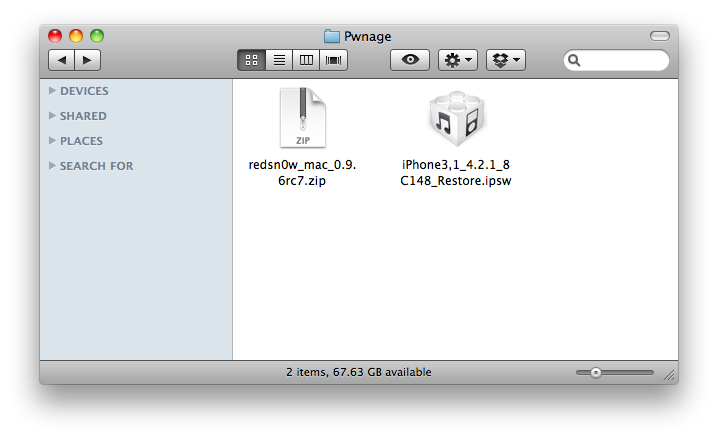
Create a Pwnage folder on your Desktop and in it place:
● RedSn0w 0.9.6rc7
● Your iPhone firmware ipsw (download here)


Step Two
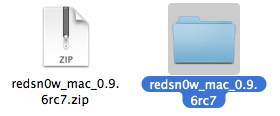
Double click the RedSn0w archive to extract it.


Step Three
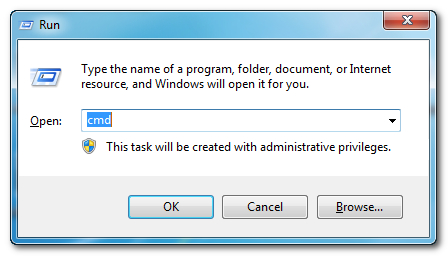
Press the Windows and R key then input cmd and click OK to launch the Command Prompt.


Step Four
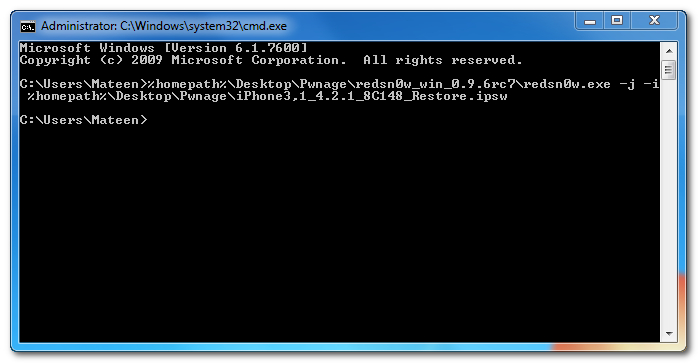
Input the following command for devices with the new bootrom:

%homepath%\Desktop\Pwnage\redsn0w_win_0.9.6rc7\redsn0w.exe -j -i %homepath%\Desktop\Pwnage\iPhone3,1_4.2.1_8C148_Restore.ipsw

Input the following command for devices with the old bootrom (iPod 2G, iPhone 3GS):
%homepath%\Desktop\Pwnage\redsn0w_win_0.9.6rc7\redsn0w.exe -j -o -i %homepath%\Desktop\Pwnage\iPhone2,1_4.2.1_8C148a_Restore.ipsw

**Important: remember to change the filename to the filename of the ipsw you downloaded in Step One.


Step Five
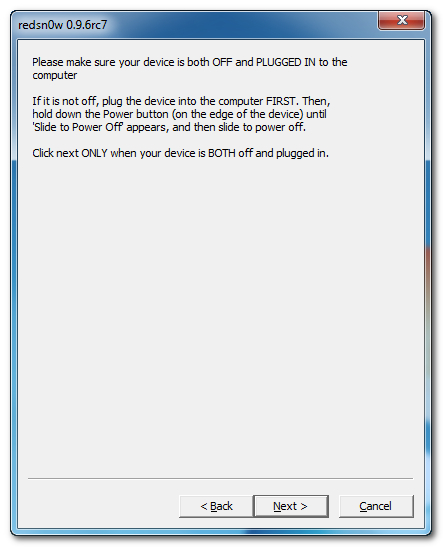
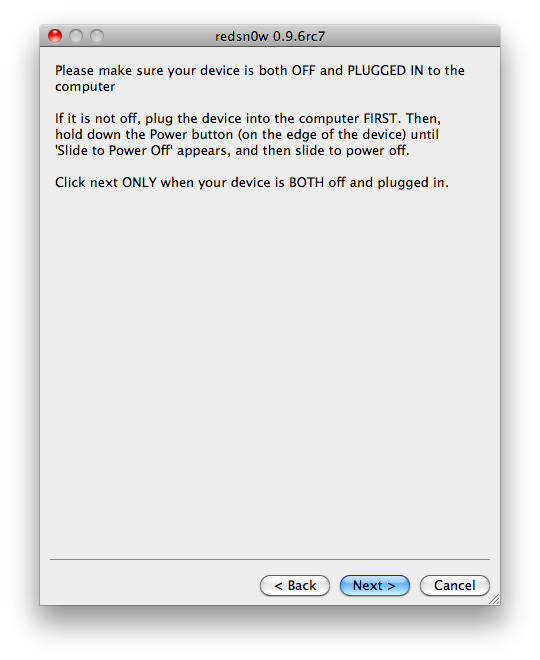
RedSn0w will now open, instruct you on placing your iPhone into DFU mode if it isn't already, and boot your device.


*thanks iclarified*

Our new Forum is now open here or on the top tabs marks Forums, please register and post..

For the latest tech stories, follow us on Twitter at
@iphonepixelpost or @limerain_com
www.iPodSets.com
- Posted using my iPhone 4

How to Quickly Boot Your Tethered Jailbroken iPhone (Mac)

These are instructions on how to quickly boot your tethered jailbroken iPhone using RedSn0w for Mac

Step One
Create a Pwnage folder on your Desktop and in it place:
● RedSn0w 0.9.6rc7
● Your iPhone firmware ipsw (download here)


Step Two
Double click the RedSn0w archive to extract it.


Step Three
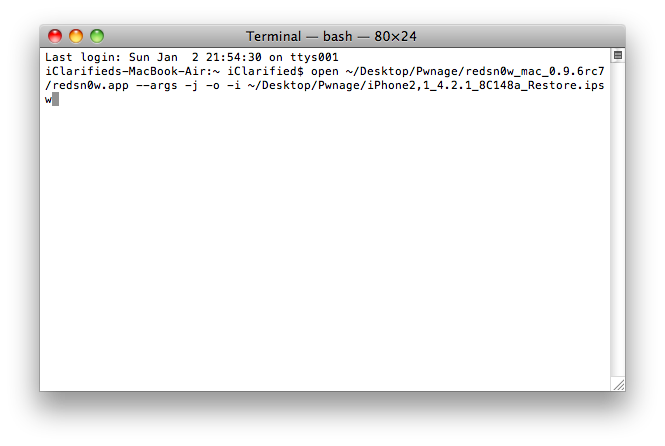
Launch Terminal from Applications:Utilities folder.


Step Four
Input the following command for devices with the new bootrom:

open ~/Desktop/Pwnage/redsn0w_mac_0.9.6rc7/redsn0w.app --args -j -i ~/Desktop/Pwnage/iPhone3,1_4.2.1_8C148_Restore.ipsw

Input the following command for devices with the old bootrom (iPod 2G, iPhone 3GS):
open ~/Desktop/Pwnage/redsn0w_mac_0.9.6rc7/redsn0w.app --args -j -o -i ~/Desktop/Pwnage/iPhone2,1_4.2.1_8C148a_Restore.ipsw

**Important: remember to change the filename to the filename of the ipsw you downloaded in Step One.


Step Five
RedSn0w will now open, instruct you on placing your iPhone into DFU mode if it isn't already, and boot your device.

*thanks iclarified*

Our new Forum is now open here or on the top tabs marks Forums, please register and post..

For the latest tech stories, follow us on Twitter at
@iphonepixelpost or @limerain_com
www.iPodSets.com
- Posted using my iPhone 4